Tagging your detector — Minelab, XP, Nokta, and the brand leaderboard
The new detector brand and model fields on /identify — how to use them, what they don't affect, and how they power the upcoming brand leaderboard.
Two new optional fields landed on the /identifyform: detector brand and detector model. Tag each find with the machine you used, and DetectID’s on-platform leaderboard surface (coming next) starts to make sense of who finds what with which detector. Here’s how to use the fields and the thinking behind adding them.
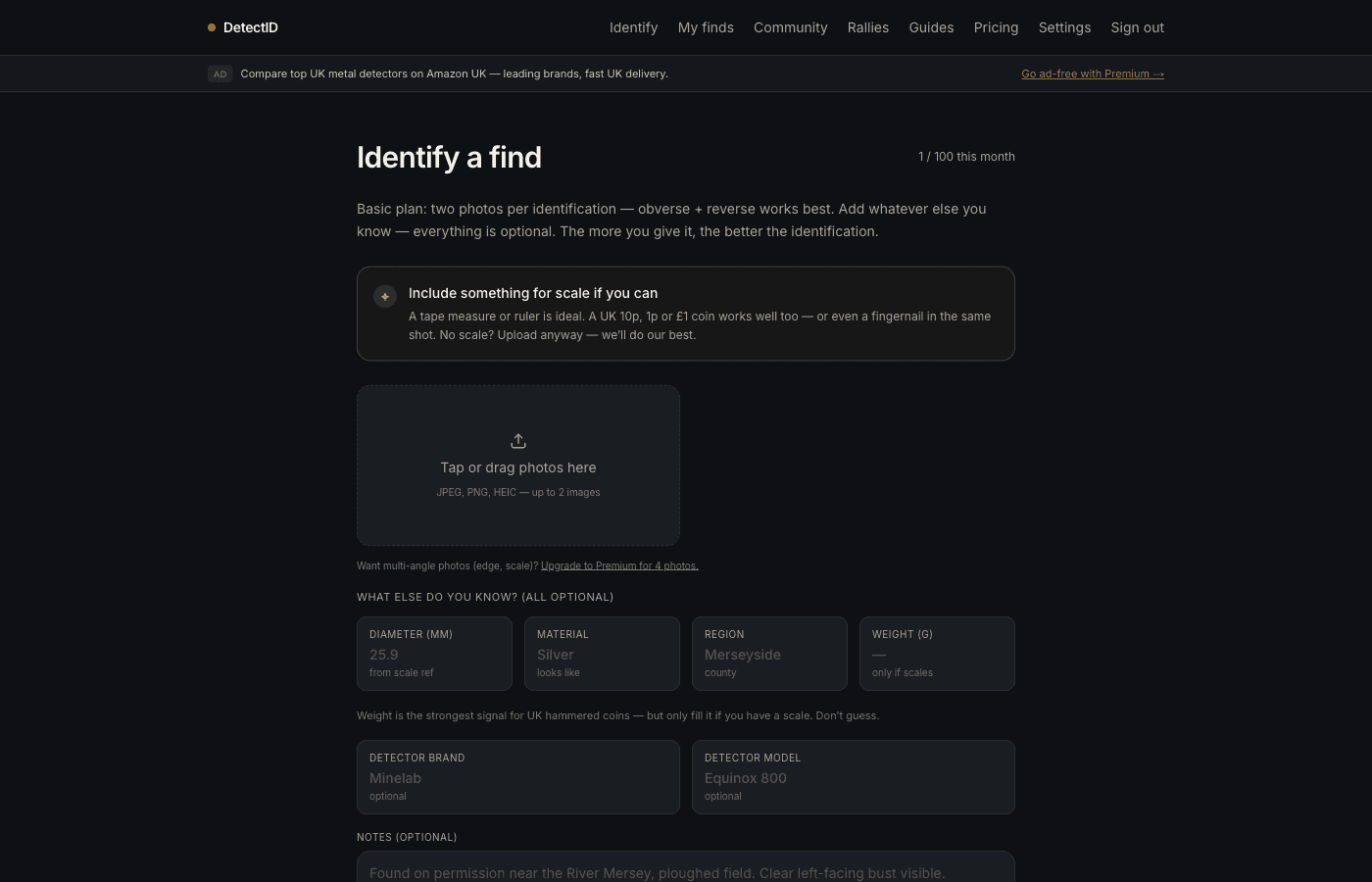
Where to find the fields
Open /identify. Scroll past the photo upload area to the “What else do you know?” section. Below the existing fields (diameter, weight, material, region) you’ll find two new ones:
- Detector brand. Free text with autocomplete on the common UK brands.
- Detector model. Free text. Pre-filled with your profile default.
The brand autocomplete
The brand field has a datalist autocomplete with the brands most-used by UK detectorists:
- Minelab
- XP
- Nokta Makro
- Garrett
- Quest
- Whites
- Fisher
- Tesoro
- Deteknix
- Detech
The autocomplete is a nudge toward consistent spellings — so the upcoming leaderboard groups all Minelab users together, regardless of who typed “Minelab” vs “MINELAB” vs “minelab”. You can override it with free text if your brand isn’t on the list (Lesche, Bounty Hunter, Tek-PR, OKM, anything else).
The model field
Free text, no autocomplete — model names vary too much for a useful suggestion list. Typical examples:
- Equinox 800, Equinox 900, Manticore (Minelab)
- Deus II, ORX (XP)
- Legend, Simplex+ (Nokta Makro)
- Apex, AT Max, ACE 400 (Garrett)
- X10, Q60, Q40 (Quest)
- V3i, MX Sport (Whites — brand discontinued but lots still in use)
Whatever you type becomes your profile default after the first tagged find — subsequent uploads pre-fill. You can clear the field on a specific find if you used a different machine that day.
Why we added this
Detectorists want to know “which detector finds what”
The most common detector forum debate is about which brand / model is best for which conditions. With brand tags on real finds, we can answer that question with data rather than opinion. After enough finds are tagged, you’ll see patterns: which detector turns up the most hammered silver, which clears trash best on iron-heavy ground, which Minelab model performs in mineralised soil.
It powers the upcoming brand leaderboard
Once enough tagged finds accumulate, a brand leaderboard appears: “Top finds by detector brand this month”, “Most hammered silver per detector model”, that sort of thing. Helps newer detectorists choose their first machine; helps experienced detectorists see if it’s time to upgrade.
It opens a sponsorship lane
Brand pages — one per detector manufacturer — are a natural future feature. Each brand page could show recent finds by that brand, top finders, manufacturer-curated content. We’d offer brands the chance to sponsor their own pages, which gives us a revenue lane that doesn’t affect the identification engine cost.
What it doesn’t affect
- Identification accuracy.The engine doesn’t use brand or model to identify finds. It’s stored as a tag on the find, not fed into the reasoning chain.
- Privacy.Brand and model only become public if you share the find — and even then, only on the find’s detail page, not as a separate signal.
- Your existing finds.Migration adds the columns nullable, so old finds remain untagged. You can retroactively tag old finds if you want by opening the find’s detail page and editing.
Tagging old finds retroactively
If you want to tag a year of existing finds with the detector you used at the time:
- Go to /finds.
- Open each find from your collection.
- Tap the edit button on the brand and model fields.
- Set the brand and model. Save.
Manual one-at-a-time, but it’s only worth doing if you’ve been on the same detector consistently. If you switched machines mid-year and don’t remember which find came off which, tag forward from now and leave the older ones untagged.
Multiple detectors
Some detectorists run two machines — a deep-seeker for permission walks and a high-frequency model for beach work. The profile default pre-fills the brand and model fields but you can override on every upload. Set your default to your most-used machine; override when you used the other one.
If you switch between two main machines about equally, leave the profile default empty and type the brand on each upload. Less convenient but more accurate.
Brand vs model — both useful?
Yes. Brand is the rough category (“a Minelab user”); model is the specific machine (“an Equinox 800 user”). The leaderboard will surface both views — roll-up by brand for a community-wide view, drill-down by model for the comparison-shopping detectorist.
Tagging brand without model is fine — sometimes you don’t want to nail it down to the model level. Tagging model without brand is less useful; the model name often doesn’t imply the brand on its own (e.g. “Legend” could be Nokta or could be something else).
Privacy of brand data
Your detector brand and model appear:
- On the find’s detail page (visible to you always; visible to others only if you share the find publicly).
- On the CSV export of your collection.
- Aggregated into the brand leaderboard (eventually) — anonymised counts, not individual finds.
Not collected by detector brands themselves — we don’t share your data with manufacturers. The aggregate leaderboard view is public, the individual mapping of you-to-detector stays in your account.
Common questions
Do I have to tag my detector?
No. Both fields are optional. Leave them blank if you don’t want to participate in the leaderboard or prefer to keep your gear private.
What if I borrow a friend’s detector?
Tag the find with the borrowed detector’s brand and model — or leave it blank for that one. Either is fine.
Can I change my default later?
Yes — in Settingsunder the “Detecting defaults” section. Edits apply from your next upload onward; existing finds aren’t affected.
What about pinpointers?
We don’t collect pinpointer data separately — the detector field is for the main metal detector. If you want to log pinpointer too, put it in the notes field.
When does the brand leaderboard go live?
Coming in the next batch of free add-ons (seethe roadmap post). We’re waiting for enough tagged finds to accumulate before launching the leaderboard — otherwise an anaemic-looking table would do the feature a disservice.
Next steps
- Tag your next find: app.detectid.co.uk/identify.
- Set defaults: Your settings page, explained.
- Roadmap including the leaderboard: What we’re building next.
Try DetectID on a real find
Upload a photo and we’ll return a calibrated shortlist with period, denomination, ruler and full reasoning chain.
Identify a find